
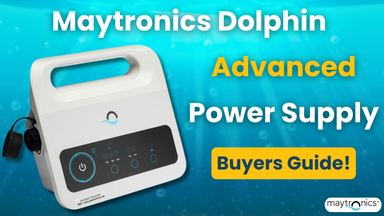
Why the Maytronics Dolphin Advanced Power Supply Is the Ultimate Upgrade for Your Robotic Cleaner
Published by Cam Steele on 12/08/2025
Posted in: Robotic Pool Cleaners
A Dolphin robotic cleaner is one of the most effective ways to keep your pool crystal clear. These machines work hard to scrub, filter, and circulate your water, but even the best cleaners rely on a dependable power source. The Maytronics Dolphin Advanced Power Supply 99956035US-F1 / 99956035US-ASSY delivers the stable and efficient performance required to keep your robot running at its best every single cycle. Whether you're replacing a failing unit or upgrading an older setup, this advanced power supply ensures your Dolphin cleaner is ready for season-long reliability and peak operation!
Maytronics Advanced Power Supply Performance
Modern Digital Controls
This upgraded power supply makes operation easier than ever. The simplified interface features intuitive buttons and clear indicator lights, allowing you to start cleaning cycles, pause operation, and monitor system status with zero confusion. If your old power supply had dim or inconsistent controls, you’ll immediately appreciate the clarity of this updated design.
Improved Energy Efficiency
Maytronics engineers its power supplies with consistent, efficient output in mind. This unit delivers steady power flow without unnecessary energy use, helping your Dolphin perform at maximum strength while keeping power consumption in check.
Built for Outdoor Durability
Poolside environments can be demanding, but this power supply is built to handle them. UV-resistant materials, reinforced seams, and a weather-protected housing work together to ensure long-lasting performance, even in hot, humid, or sunny conditions.
Enhanced Reliability
Stable voltage output is essential for smooth cleaning cycles. This advanced unit protects your cleaner’s internal components from fluctuations, reduces the risk of mid-cycle shutdowns, and supports consistent robot movement and suction power.
Key Features at a Glance
- Digital control interface
- Energy-efficient operation
- Rugged, weather-resistant design
- Provides stable, consistent power for Dolphin robotic cleaners
Signs It’s Time to Replace Your Power Supply
Is your power supply nearing the end of its life? Here are some of the most common warning signs:
- Your cleaner won’t power on or shuts off randomly
- Indicator lights flicker, dim, or fail completely
- Cleaning cycles stop before finishing
- Your cleaner has noticeably weaker suction or reduced movement
- The power supply overheats or makes buzzing/humming noises
Because power supplies often degrade gradually, performance may decline significantly before the unit fails. Replacing a struggling power supply early can help protect your Dolphin and restore strong cleaning performance.
How to Install the Maytronics Dolphin Advanced Power Supply (99956035US-F1 / 99956035US-ASSY)
Installing your new power supply is simple. Follow the steps below for a safe and proper setup:
1. Position the Power Supply Properly
- Place the unit at least 10–12 feet from the pool.
- Keep it on a dry, elevated surface, never on grass or wet decking.
- Ensure there is full ventilation on all sides of the unit.
2. Connect the Cleaner Cable First
- Before plugging into the wall, attach the floating cable from your robot.
- Push the connector in until it clicks securely; never force it.
- Inspect the plug for debris or bent pins before connecting.
3. Plug Into a GFCI-Protected Outlet
- Always use a GFCI outlet for safety.
- Avoid extension cords, power strips, or surge protectors, as they may cause unstable voltage.
4. Power On the Unit
- Press the power button to turn the supply on.
- Select the desired cleaning cycle depending on your Dolphin model.
- Check that all indicator lights illuminate correctly.
5. Start the Cleaning Cycle
- Gently place the cleaner into the pool.
- Allow the full cleaning cycle to run without interruption.
- Turn off the power supply before removing the cleaner from the water.
6. Keep the Unit Protected
- Store indoors when not in use for long periods.
- Avoid leaving it outside during storms or heavy rain. While weather-resistant, it is not fully waterproof.
Troubleshooting Common Dolphin Power Supply Issues
Before buying a replacement, try these quick troubleshooting steps:
1. Power Supply Won’t Turn On
- Confirm the GFCI outlet is working
- Try another outlet
- Ensure all cable connections are tight
2. Cleaner Turns On, Then Shuts Off
- Inspect the floating cable for damage or water intrusion
- Reset the power supply by unplugging it for 10 minutes
- Ensure the unit remains dry and elevated during use
3. No Indicator Lights
- Check for a blown fuse (if your model uses one)
- Clear dust from vents
- Perform a full reset by unplugging for 10 minutes
4. Buttons Not Responding
- Recheck the cable connection at the power supply
- Look for corrosion on connector pins
- Ensure you’re using the correct button sequence
5. Overheating
- Move the unit into shade
- Ensure vents are unobstructed
- Avoid placing the unit on hot or heat-retaining surfaces
Upgrade Your Dolphin Today
If your cleaner is losing power, shutting off mid-cycle, or showing signs of age, replacing the power supply is one of the fastest and most effective ways to restore full performance. The Maytronics Dolphin Advanced Power Supply 99956035US-F1 / 99956035US-ASSY delivers the durability, efficiency, and reliability needed to keep your pool sparkling all season. Ready to get your Dolphin running like new? Order your replacement power supply from EZ Pool & Spa Supply today!